Low-Code Integration
The fastest path to production. Add one line of code — then configure everything visually. No developers needed after setup.
One Line. Full Control.
Add a single script tag to your website — that's the only developer involvement required. After that, your marketing and analytics users configure all event tracking visually through the rCDP Low-Code portal. No code changes. No deployments. No IT dependency.
The only code you'll ever need
<script type="text/javascript"
src="https://rcdp-us.algonomy.com/js/<TENANT_HASH>/<SITE_HASH>.js"
async>
</script>
How It Works
The Low-Code integration separates what to track from how your website is built. Once the SDK is embedded, the rCDP portal becomes your command center for event instrumentation.

-
Embed the JS SDK (one-time developer task)
Add the script tag to your website.
-
Understand your website's DOM structure
Identify elements containing product IDs, prices, categories, and cart details.
-
Create JavaScript Integration Widgets (JIW)
Configure how events are captured, mapped, and triggered.
-
Publish instantly to production
No deployment pipeline. Changes go live immediately.
What You Can Do Without Writing Code
-
DOM-Based Data Extraction: Extract product IDs, prices, categories, and attributes directly from page elements.
-
JavaScript Integration Widgets (JIW): Define triggers, mappings, and logic visually.
-
Live Preview & Testing: Validate configurations before publishing.
-
Instant Production Rollout: Publish changes instantly.
-
Enterprise Governance: Dev/Test/Prod environments, versioning, audit logs.
-
Event Trigger Configuration: Configure triggers like click, load, scroll, or custom conditions.
QA Mode — Test Before You Go Live
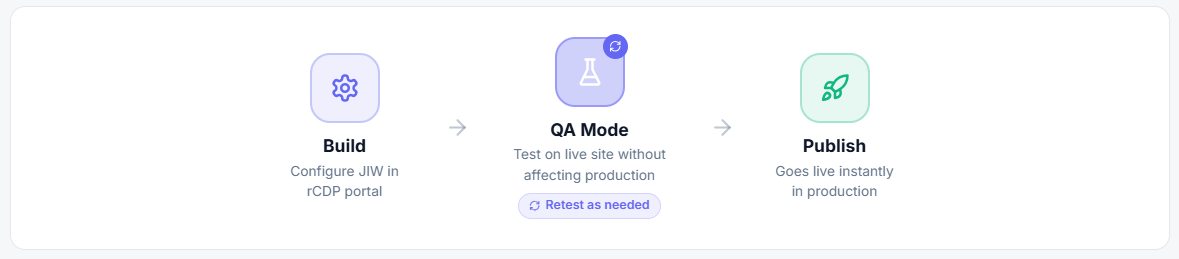
QA Mode allows you to validate event firing and data extraction on your live website without impacting production traffic.
-
Activate QA Mode: Injects script only for your session
-
Validate on Live Site: Test with real DOM and data
-
Iterate & Retest: Fix and retest instantly
Version Control & Audit Trail
-
Full Version History: Track all changes
-
Instant Rollback: Restore previous versions instantly
-
Audit Logs: Track who changed what and when
-
Environment Separation: Dev, Test, Production workflows
Complete Operational Independence
| Traditional Approach | With Low-Code Integration |
|---|---|
| Write code → QA → Deploy | Configure → QA Mode → Publish instantly |
| Wait for sprint | Add events anytime |
| Regression testing required | No site code impact |
| IT dependency | Self-service |
| Weeks to production | Minutes to production |
Configurable Event Types
All standard rCDP events can be configured visually. The portal generates the same rcdp.executeEventByData() calls used by the JS SDK.
- Home Page
- Product Views
- Category Views
- Search Events
- Add to Cart
- Cart Edits
- Checkout
- Transactions
- Login / Register
- Wishlist Actions
- Custom Events
When to Choose Low-Code
- Complete independence from deployment cycles
- Need faster go-live
- Marketing-driven tracking
- Complex release processes
- Governed and auditable setup
Low-Code in Action — Examples
Product View Event
// Product View — JavaScript Integration Widget
if (window.meta != undefined && window.meta.page.pageType == 'product')
{
eventContext.eventType = "eventProduct";
eventContext.eventData.productId = window.meta.product.variants[0].id;

if (eventContext.util.getParamByName('variant') != null)
{
eventContext.eventData.productId = eventContext.util.getParamByName('variant');
}

let price = window.meta.product.variants[0].price;
eventContext.eventData["price"] = parseFloat((parseInt(price) / 100).toFixed(2));

return true;
}
Add to Cart Event
// Add to Cart — JavaScript Integration Widget
if (ajaxContext.request != null)
{
let url = ajaxContext.request.responseURL;

if (url.includes("cart/add"))
{
eventContext.eventType = "eventAddToCart";
eventContext.eventData.productId = ajaxContext.response.sku;
eventContext.eventData.sku = ajaxContext.response.sku;
eventContext.eventData.quantity = ajaxContext.body.quantity;
eventContext.eventData.totalQuantity = ajaxContext.response.quantity;
eventContext.eventData.price = parseFloat(
(parseInt(ajaxContext.response.price) / 100).toFixed(2)
);

return true;
}
}
Category View Event
// Category View — JavaScript Integration Widget

if (window.RR_CATEGORY != null)
{
eventContext.eventType = "eventCategory";
eventContext.eventData = {};
eventContext.eventData.categoryId = window.R3_CATEGORY.id;

return true;
}
Evaluation
Advantages
- Zero IT involvement after setup
- Independent of release cycles
- No coding required
- Instant rollout
- Governed SDLC
- Versioning and rollback
- Audit logs
- Faster experimentation
Good to Know
- Initial SDK embed requires developer (5 mins)
- DOM changes may require updates